Querying Crossref
What this page does:
This page queries Crossref for funder information tied to a given list of identifiers for different publications. It then returns table and text versions of the information retrieved and visualizations comparing the publications in aggregate. See the "How to use this app" and "Example usage" pages for more information.
Test a single Digital Object Identifier (DOI):
Upload a DOI file:
Input data
Click button to query Crossref
Results
If Crossref metadata is inaccurate or incomplete, the visualizations, tables, and text returned will also be inaccurate. Further, discrepancies in how funders are listed can result in different totals for the tables and the plots. For example, if the same funder is listed multiple times because they provided multiple grants, the total funders listed in the table will be less than the total funders listed on the plots.
Item-to-funder table:
Summary funder-to-item table:
Detailed funder-to-item table:
Plots
Query results and errors
Work identifiers with errors:
Work identifiers without listed funders:
Nested dictionaries
Format:
  {'Work DOI 1': [
      {'Funder DOI 1': 'specific funder information'},
      {'Funder DOI 2': 'specific funder information'}
      ],
  'Work DOI 2': [...]
    }
Querying ClinicalTrials.gov
What this page does:
This page queries ClinicalTrials.gov for sponsor and collaborator information tied to a given list of identifiers for different publications. It then returns table and text versions of the information retrieved and visualizations comparing the publications in aggregate. See the "How to use this app" and "Example usage" pages for more information. Please note that code to query ClinicalTrials.gov was initially developed by Colby Vorland.
Test a single National Clinical Trial Identification Number (NCTID):
Upload a NCTID file:
Input data
Click the button to query ClinicalTrials.gov
Results
If ClinicalTrials.gov metadata is inaccurate or incomplete, the visualizations, tables, and text returned will also be inaccurate.
Item-to-funder table:
Plots
Query results and errors
Work identifiers with errors:
Work identifiers without listed funders:
Results dictionaries
Format:
  {'Work NCTID 1': [specific sponsor information],
  'Work NCTID 2': [...]
    }
How to use WhoFundedIt
What this application does:
This application queries Crossref or ClinicalTrials.gov for funder/sponsor information tied to a given list of Digital Object Indentifiers (DOIs) or National Clinical Trial Identification Numbers (NCTIDs) for different publications. It then returns table and text versions of the information retrieved and visualizations comparing the publications in aggregate.
When querying Crossref:
Specifically it uses the Crossref Work object, parsing JSON files for each publication queried. See Crossref documentation for more details: Non-technical overview and detailed documentation, scroll down to Models > Work to see specific attributes
When querying ClinicalTrials.gov:
Specifically it uses the ClinicalTrials.gov Sponsor/Collaborator module, parsing JSON files for each publication queried. Please note, ClinicalTrials.gov defines a sponsor as "The organization or person who initiates the study and who has authority and control over the study" and a collaborator as "An organization other than the sponsor that provides support for a clinical study. This support may include activities related to funding, design, implementation, data analysis, or reporting." See ClinicalTrials.gov documentation for more details: https://clinicaltrials.gov/data-api/api. Class definitions can be found under AgencyClass
How to use this application:
1. Either enter a single identifier or create an identifier file, which is a text file (.txt file) of Digital Object Identifiers (DOIs) or National Clinical Trial Identification Numbers (NCTIDs) for all publications you would like to compare.
Formatting guidelines:
- One identifier per line in the text (.txt) file.
- DOIs can be in any of the following formats:
- https://doi.org/10.XXX/XXXX
- doi:10.XXXX/XXXX
- 10.XXXX/XXXX
- NCTIDs can be in any of the following formats:
- NCT########
- nct########
- The app will ignore blank/empty lines.
In a citation manager such as Zotero, you can create a DOI file by:
- Exporting a library or collection to .csv format.
- Copying the DOI column of the .csv file.
- Pasting the DOI column into a text editor such as Notepad (Windows) or TextEdit (Mac).
- Saving the resulting file. Blank lines do not need to be removed.
You can also manually copy and paste identifiers into a text file using text editor such as Notepad (Windows) or TextEdit (Mac).
2. If using an identifier file, on the webpage, click "Browse..." and select the text file you created.
Functionality for files other than text (.txt) is forthcoming.
3. Review information listed under "Input data".
This will show cleaned and standardized versions of the identifiers you submitted
4. Hit the button "Query Crossref" or "Query ClinicalTrials.gov"
This will query the Crossref or ClinicalTrials.gov API for each identifier you submit. Large requests can take some time.
5. View results
The item-to-funder table, funder-to-item table, plots, base query results, and errors are viewable on different tabs. You will be able to copy the identifiers that had errors when querying the API and the Python dictionaries used to create visualizations shown. Code to query APIs, create the text/tables, and generate visualizations is stored on the Information Quality Lab GitHub
A note on usage:
If Crossref or ClinicalTrials.gov metadata is inaccurate or incomplete, the visualizations, tables, and text returned will also be inaccurate. Please also note that discrepancies in how funders are listed for Crossref specifically can result in different totals for the tables and the plots.
Example use of WhoFundedIt
The following images were generated using the WhoFundedIt app. Download the DOI file used for generation; it is taken from a workshop held by the National Academies of Science, Engineering, and Medicine in August 2020 on airborne transmission of SARS-CoV-2. Workshop page viewable here.
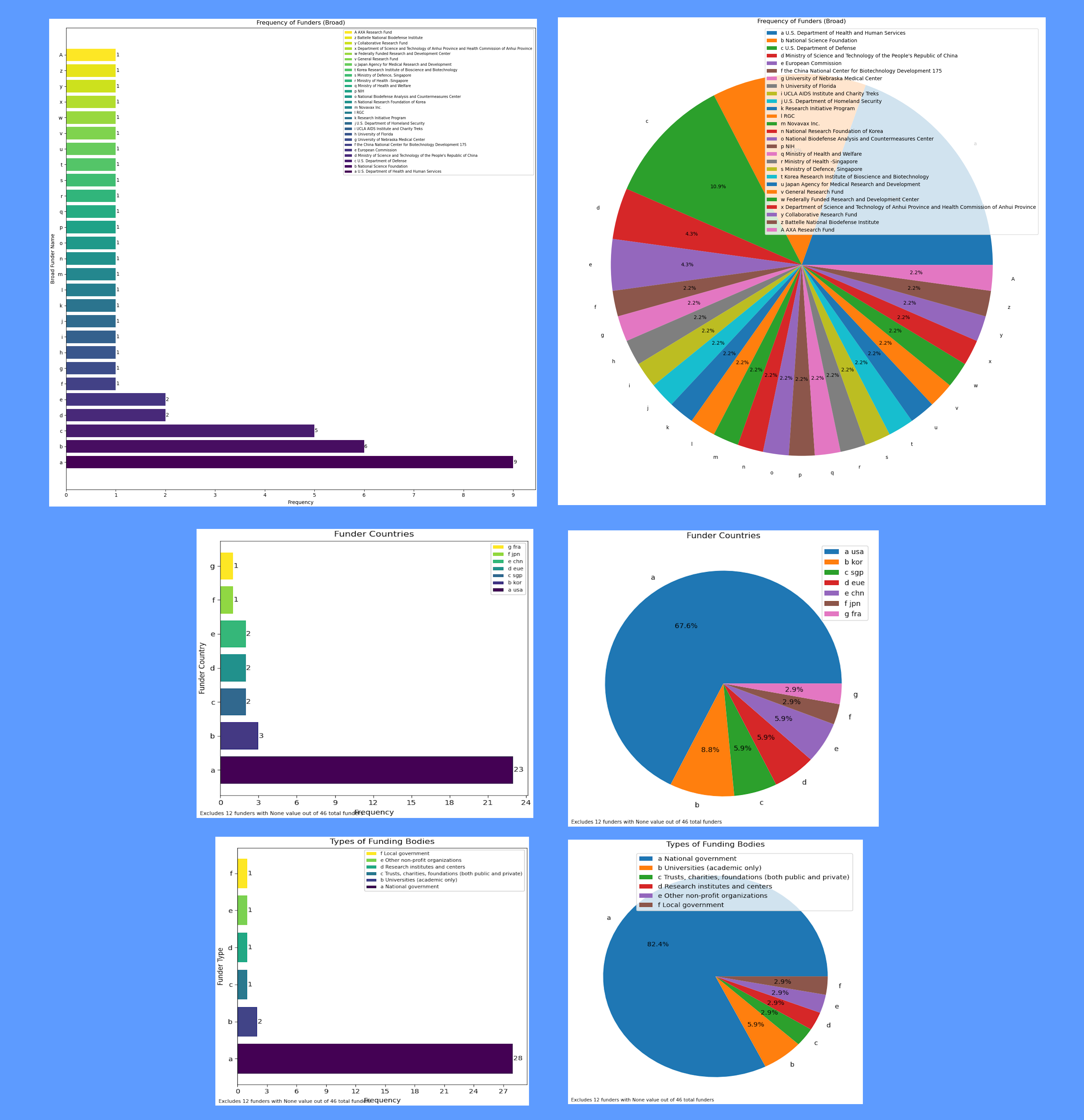

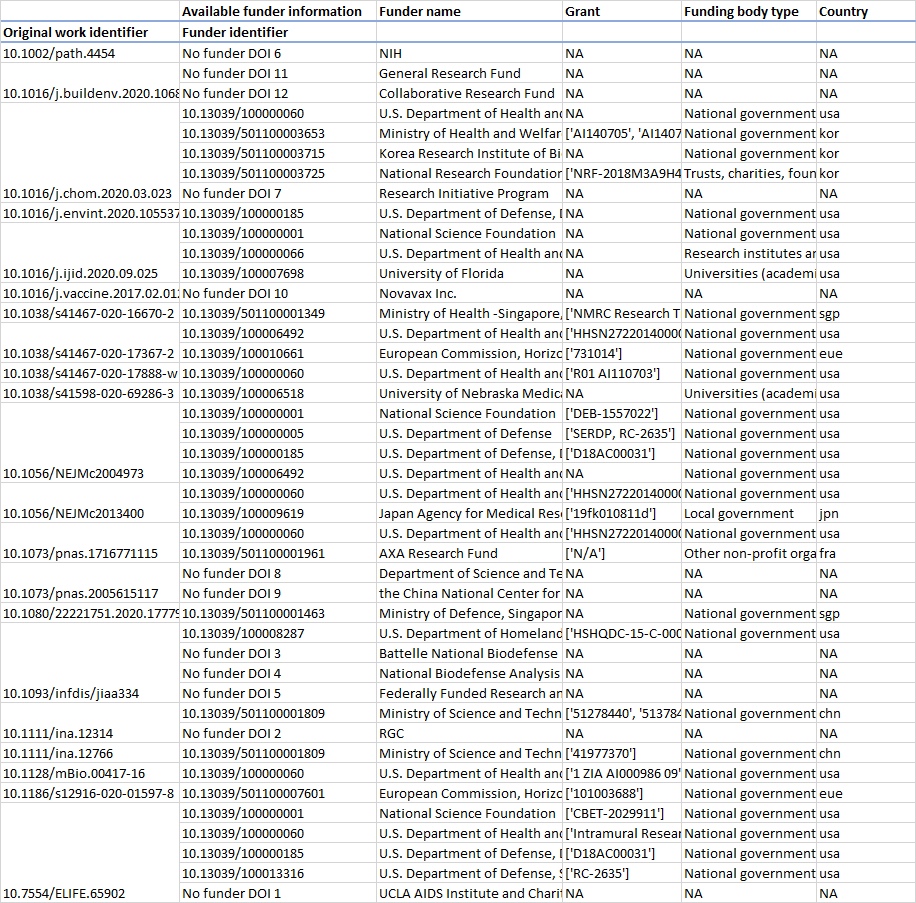

These visualizations give insight into the funding sources of publications at this conference.
- The top two figures show high-level funder names. The biggest funder is the U.S. Department of Health and Human Services.
- The middle two figures show funder countries, with the US being most prevalent by far.
- The bottom two figures show funding body types, with the most common being national governments.
- The table shows a sample output, broken down by work identifier then by funder identifier. NA indicates that the given information is not available.